 Nourmio
One food label in Nourmio, MyFitnessPal, and Cronometer
See how three iPhone food diaries handled one lemon-ginger product, and use the checklist to verify your own entry before saving.
Start with the package and compare each app's result for the same amount. In one iPhone recording, a photo estimate and a barcode match both showed 210 calories per 100 g. A third app's label-photo form showed 330 calories per 100 g for that product. The label listed 210.
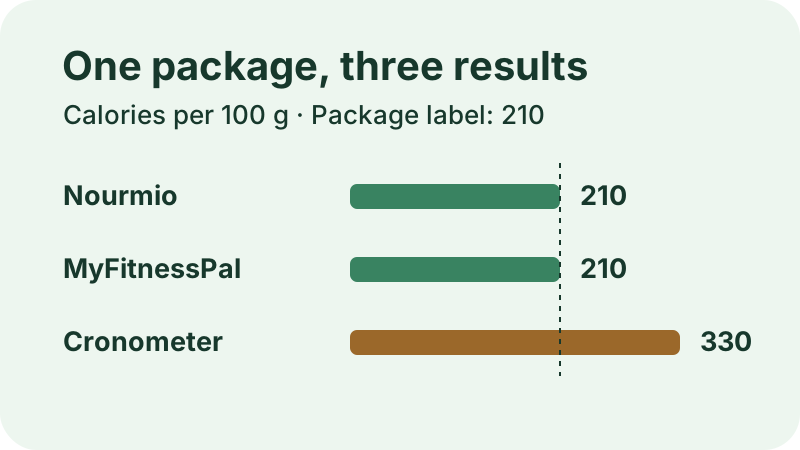
What each app showed for the same product
We make Nourmio. These observations come from iPhone recordings made on November 8, 2026, with the same Global Village lemon-ginger purée. The package listed 210 calories and 52 g of carbohydrates per 100 g. It did not show a separate sugar value on the visible panel.
| App and method | Calories per 100 g | What happened next |
|---|---|---|
| Nourmio, Photo AI | 210 | The diary showed 420 calories for the 200 g entered. |
| MyFitnessPal, barcode scan | 210 | The scanner opened a Premium offer. After the trial was activated, the match was saved as a 100 g diary entry. |
| Cronometer, Create Food from label photos | 330 | After the barcode lookup did not return a match, the new food form showed 330. The recording showed an Add to Diary button for this result. |
The Cronometer value was 120 calories higher per 100 g than the package value in this example. Check the preview before saving when you use a label photo to fill a new food form. The recordings show three different ways of getting to a food entry, each with its own review step.
Check a food entry before you save it
- Match the exact product. Look for the same brand, variety, and package. If a barcode gives you no result, check whether you can enter the label values yourself.
- Check the serving basis. A database entry might use grams, one serving, or one jar. Work out how much that unit represents before entering the amount.
- Compare the fields you use. Check calories and the sugar field separately. If the label gives only carbohydrates, leave the sugar value open until you have a separate figure.
- Reopen the saved entry. Check whether the diary shows the amount you intended to log and the nutrition values you expected.
Using the package value, 150 g comes to 315 calories (210 × 150 ÷ 100). That is an example calculation. Use the label’s serving information to run the same check on your own food.
For a photo-based entry, compare the result with the package. For a barcode entry, check the match before you use the result.