 Nourmio
Why a US nutrition label can show zero calories
Understand how the US Nutrition Facts panel can round a small calorie amount to zero and what changes when you use several servings.
A US Nutrition Facts panel may show 0 Calories when the amount before rounding is below 5 calories per serving. Check the serving size before using the number. With several servings you can work out a limit from the rounding rule, while the panel leaves the exact amount unknown.
Read the serving size above the zero
Find the serving size at the top of the panel. Then see how much you used. If the panel has a column for the entire package and you used the entire package, read that column directly.
For the US Calories row, amounts below 5 per serving may appear as zero. The rule uses increments of 5 calories through 50 and increments of 10 above 50. Read the rule for the specific row if you are checking another nutrient.
Scale the limit, then keep the exact value open
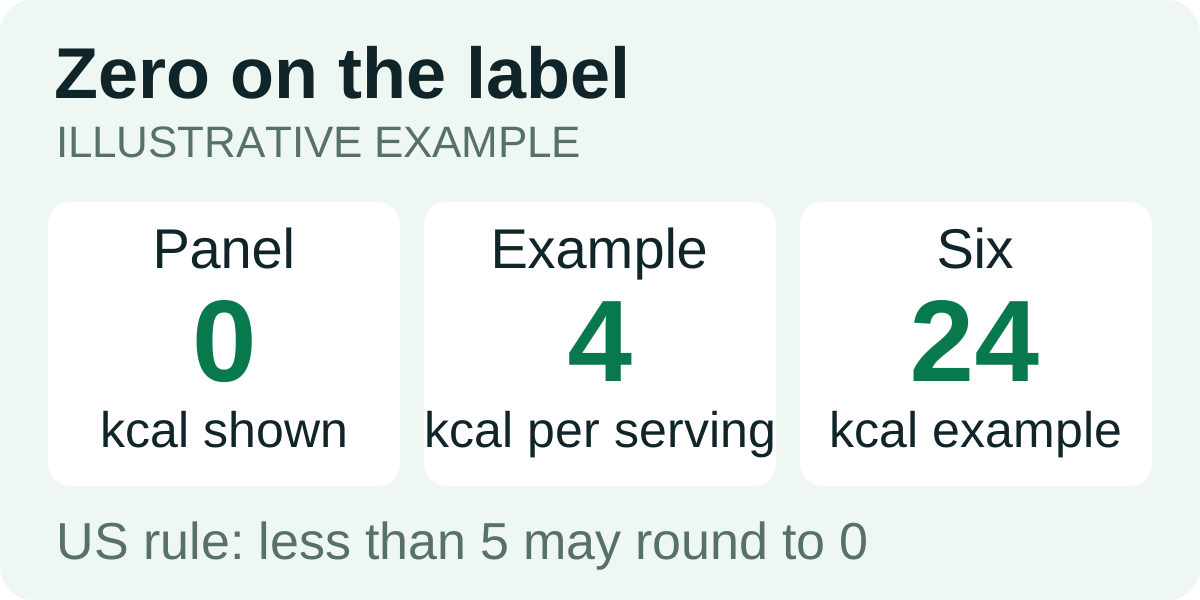
Imagine the value behind a 0-calorie declaration is 4 calories per serving. Six such servings would contain 24 calories. Those figures show the arithmetic with a hypothetical label.
With a 0-calorie declaration, the rounding allowance gives an upper limit on the declared basis. Six matching servings represent less than 30 calories under that calculation, since 6 × 5 = 30 and the amount per serving is strictly below 5. The label leaves the exact value unknown, and the calculation does not measure an individual portion.
If you can get a figure from the manufacturer for the amount you used, keep the amount and its source with the value. That gives you a better reference for repeating the entry.
Record the value you actually have
“0 on label per serving, used six label servings” is a useful note. It preserves the amount you used and the number the panel showed. Keep the note with your label reference. If you log the meal in Nourmio, enter the portion you used. See how to read a US Nutrition Facts label to find the serving amount and the correct column.